Introduction
Microsoft introduced a new system service routine named NtCompareObjects – user-mode caller access through a system call transition is supported – at the beginning of Windows 10; this kernel routine allows you to accurately determine whether two handles represent the same kernel object. NtCompareObjects will work for at-least process object and thread object handles.
The bad news is that this system service routine is not officially documented by Microsoft. It is a simple system service routine and due to how it works, it is unlikely that it would be suddenly broken or removed in the future in my opinion, but you should always apply caution when using anything which is not officially documented for stability, compatibility and security purposes.
If you use any information presented on this article, you are responsible for any damages/consequences of using it – there is no warranty implied.
I am working with a Windows 10 Enterprise 1809 (64-bit) environment and the AMD64 Instruction Set Architecture for throughout this article. Furthermore, all of the binaries used for reverse-engineering are the native 64-bit versions (located in the \Windows\System32 directory).
Documentation for using NtCompareObjects
The NtCompareObjects routine is exported by the Windows kernel and as such, it is accessible to all kernel-mode software through a static or dynamic import: the former can be achieved with __declspec(dllimport) and the latter can be achieved with the MmGetSystemRoutineAddress kernel routine. You should check the Windows Driver Kit (WDK) header files to make sure it isn’t already defined before you attempt to define it yourself.
Routine prototype
NTSTATUS
NTAPI
NtCompareObjects (
    _In_ HANDLE Handle,
    _In_ HANDLE Handle2
);
Arguments
Handle – the first handle to be used in the comparison against the Handle2 argument.
Handle2 – the second handle to be used in the comparison against the Handle argument.
Return Value
NTSTATUS.
If both of the caller-provided handles match to the same kernel object then the return value will be any success-indicating NTSTATUS error code (use the NT_SUCCESS macro).
If the caller-provided handles do not match the same kernel object then the return value be the STATUS_NOT_SAME_OBJECT (0xC00001AC) NTSTATUS error code.
Remarks
The handles must be for a kernel object which is handled by the Windows kernel’s Object Manager. The handles can definitely be a process or thread handle, but handles to any kernel object handled by the Windows Object Manager (with ObpKernelHandleTable) may be supported.
The STATUS_NOT_SAME_OBJECT NTSTATUS error code is not documented on the official Microsoft websites yet, but it exists in the WDK header files. You won’t be able to find it online yet but you’ll find it in the ntstatus.h header file.
//
// MessageId: STATUS_NOT_SAME_OBJECT
//
// MessageText:
//
// The objects are not identical.
//
#ifndef STATUS_NOT_SAME_OBJECT
#define STATUS_NOT_SAME_OBJECT           ((NTSTATUS)0xC00001ACL)
#endif
NtCompareObjects internals
Task One
The first task for the NtCompareObjects routine is retrieving a pointer to the _KTHREAD structure belonging to the current thread via the KeGetCurrentThread API. The _KTHREAD structure is opaque and not officially documented by Microsoft, although it is included in the debugging symbols.

The KeGetCurrentThread routine tells us that we can get a pointer to the _ETHREAD structure for the current thread using the GS register and an offset of 188h – the _KTHREAD structure is at offset zero relative to the base of the _ETHREAD structure.
The NtCompareObjects routine will need access to the _KTHREAD structure of the current thread so it can determine whether the caller is trusted or not via the PreviousMode field. The PreviousMode field of the _KTHREAD structure is part of an enumerated type named KPROCESSOR_MODE and there are only two possible choices: KernelMode (0) or UserMode (1).
The previous mode of the current thread is stored in a local variable for future reference.
Task Two
The second task for the NtCompareObjects routine is to perform a lookup with the Handle argument to get back the kernel object it points to – accomplished via the ObReferenceObjectByHandle API. The ObReferenceObjectByHandle routine internally relies on the non-exported ObpReferenceObjectByHandleWithTag API which works by performing a lookup with the non-exported ExpLookupHandleTableEntry API (with ObpKernelHandleTable as the lookup target).
The ObReferenceObjectByHandle API requests the previous mode of the current thread for the fourth argument (named AccessMode) which is why it was previously acquired as the first task.
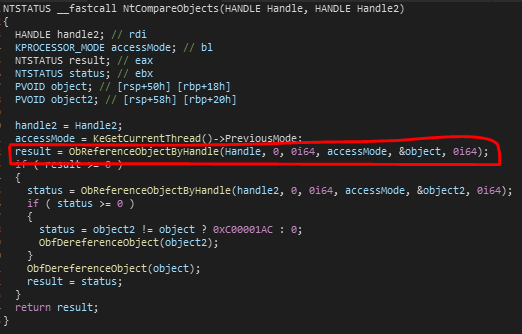
The call to the ObReferenceObjectByHandle API will result in a pointer to the kernel object the first caller-provided handle was dished out for being accessible through a local variable (which I have decided to name object). However, this is if the operation is successful – the NtCompareObjects routine performs a check after the call to ensure that the return status from the ObReferenceObjectByHandle call is any success-indicating NTSTATUS error code (this is what the conditional statement with the evaluation as result >= 0 is for – that is precisely what the NT_SUCCESS macro expands to) before continuing and if the return value is not considered success-indicating, then the routine will finish the operation and return back the failure-indicating NTSTATUS error code it was given.
Task Three
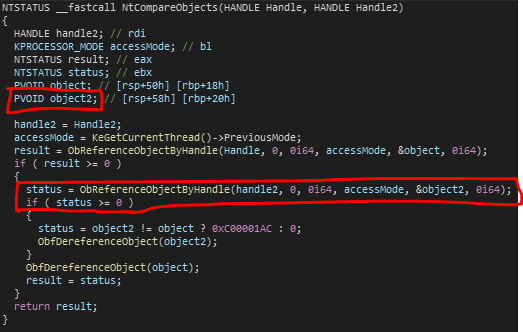
The third task for the NtCompareObjects routine is to do the same thing as we saw in the second task but for the second handle argument instead of the first handle argument. If this task is successful, a pointer to the appropriate kernel object is accessible through a local variable which I have decided to name object2.
Task Four
The fourth task of the NtCompareObjects routine is determining whether the pointer address to the kernel objects which are accessible via local variables (object and object2) point to the same destination or not.
The object variable should now store a pointer to the kernel object the first caller-provided handle was for and the object2 variable should now store a pointer to the kernel object the second caller-provided handle was for.

Below is a summary of what the highlighted part in the above image is responsible for.
- Conditional statement to determine whether the pointer address for the second kernel object is not equal to the pointer address for the first kernel object.
- If the conditional statement evaluates to true (the two pointer addresses are not matching) then the status variable is assigned a value of STATUS_NOT_SAME_OBJECT (0xC00001AC).
- If the conditional statement evaluates to false (the two pointer addresses are matching) then the status variable is assigned a value of STATUS_SUCCESS (0x00000000).
Task Five
The fifth task of the NtCompareObjects routine (prior to returning) is cleaning up any resources which have been acquired.
If the first call to the ObReferenceObjectByHandle routine is successful then NtCompareObjects ensures that it dereferences the object when it is no longer needed – accomplished via the ObfDereferenceObject API.
The same treatment is provided for the second object that is referenced if the second call to ObReferenceObjectByHandle is successful.

Does Windows actually use the NtCompareObjects routine yet?
Yes, Windows does actually use the NtCompareObjects routine.
Currently, I cannot find any references to the routine by the actual Windows kernel, but the routine is a system service routine which means it has an entry in the System Service Descriptor Table (KeServiceDescriptorTable) and thus can be invoked by a user-mode caller via a system call.

In the above figure, the system call index 99h is moved into the EAX register and then the SYSCALL instruction is executed to perform a system call transition – the system call instruction may vary between instruction set architecture, which in my case would be AMD64. The CPU will redirect execution flow to the system call handler pointed to by the IA32_LSTAR Model Specific Register (MSR) which in my case would be KiSystemCall64AmdShadow, since I have the Meltdown patch enabled – Microsoft’s Kernel Virtual Address Shadow (KVAS) feature – and am working with an AMD CPU on a 64-bit version of Windows.
The user-mode Windows module, NTDLL, has already implemented use of the NtCompareObjects system call support. To be precise, it is used by a routine exported by NTDLL named RtlIsCurrentProcess which was also introduced at the start of Windows 10. There’s another exported routine which uses NtCompareObjects named RtlIsCurrentThread.
Documentation for using RtlIsCurrentProcess
The RtlIsCurrentProcess routine is exported by NTDLL and can be used via a static or dynamic import.
Routine Description
Determines whether a caller-provided handle to a process object is a handle to the current process.
Routine prototype
BOOLEAN
NTAPI
RtlIsCurrentProcess (
    _In_ HANDLE ProcessHandle
);
Arguments
ProcessHandle – A handle to the process object you want to check.
Return Value
BOOLEAN.
If the handle to the process object provided by the caller through the ProcessHandle argument is a handle to the current process, the return value will be true.
If the handle to the process object provided by the caller through the ProcessHandle argument is not a handle to the current process, the return value will be false.
RtlIsCurrentProcess internals
Task One
The first task for the RtlIsCurrentProcess routine is to perform a conditional statement to determine whether the handle to the process object provided by the caller (via the ProcessHandle argument) is equivalent to 0FFFFFFFFFFFFFFFFh (-1).

The RCX register holds the handle value provided by the caller (the ProcessHandle argument) therefore the above figure shows a conditional statement for -1 against the handle to the process handle.
Task Two
The second task for RtlIsCurrentProcess – which is only performed if the conditional statement we have previously seen in task one evaluates to false – is calling the NtCompareObjects NTAPI routine through the use of a system call transition, supported by NTDLL.

The above figure shows the argument setup for the NtCompareObjects system call as well as the call to NtCompareObjects (NTDLL).
The ProcessHandle argument’s value stored in the RCX register being backed up to the RDX register. Afterwards, the OR instruction is used to replace the value stored in the RCX register with -1 (expressed as unsigned long long).
Once the arguments have been setup (-1 is the first argument and the ProcessHandle argument which was passed to RtlIsCurrentProcess is the second argument since it was moved to the RDX register) then the NtCompareObjects (NTDLL) routine is called which will perform the system call transition and result in NtCompareObjects (NTOSKRNL) being called.
Task Three
The third task of the RtlIsCurrentProcess routine – the last task before returning back to the caller – is deciding whether to report back to the caller that the handle to the process object they provided via the ProcessHandle argument was or wasn’t a match.

loc_18007E5AE is used to set the return value to 1 which indicates the handle to the process object provided by the caller was a match for the current process.
The second part on the right is executed if the EAX register is not zero when the test instruction is used after the NtCompareObjects call and is responsible for setting the return value to 0 which indicates the handle to the process object provided by the caller was not a match for the current process.
As I have previously mentioned, if the conditional statement in task one evaluates to true – which means the ZF flag was set when the CMP instruction was used and as a result, the Jump-If-Not-Zero (JNZ) instruction being used will not result in execution flow continuing to the machine code for task two – then we will reach code execution at loc_18007E5AE.
Source code version of RtlIsCurrentProcess
(with example of usage)
Below is a re-write of the RtlIsCurrentProcess routine to help you understand how it works better. It is much cleaner to read the re-write than the disassembly/decompilation pseudo-code and I suspect that the re-write example is more accurate to how it would appear in the official Windows code-base. For example, I would imagine that the Windows developers would be making use of the NtCurrentProcess macro.
It goes without saying that if you do decide to use RtlIsCurrentProcess, it would be a wise choice to use the official version exported by NTDLL instead of re-writing it yourself. This would ensure that you would be able to use any future updates to the API without having to find out about them and update your code manually.
#pragma comment ( lib, "ntdll.lib" )

#define NtCurrentProcess()	\
		( (HANDLE) ((ULONG_PTR)-1) )

NTSYSCALLAPI
NTSTATUS
NTAPI
NtCompareObjects (
	_In_ HANDLE Handle,
	_In_ HANDLE Handle2
);

BOOLEAN
NTAPI
RtlIsCurrentProcess (
	_In_ HANDLE ProcessHandle
)
/*++

Routine Description:

	Determines whether a caller-provided handle to a process object is a handle to the current process.

Arguments:

	ProcessHandle - A handle to the process object you want to check.

Return Value:

	BOOLEAN.

	If the handle to the process object provided by the caller through the ProcessHandle argument is a
	handle to the current process, the return value will be true.

	If the handle to the process object provided by the caller through the ProcessHandle argument is not
	a handle to the current process, the return value will be false.

--*/
{
	NTSTATUS status;

	if ( ProcessHandle == NtCurrentProcess() )
	{
		return TRUE;
	}

	status = NtCompareObjects ( NtCurrentProcess(), ProcessHandle );

	return NT_SUCCESS ( status );
}
Conclusion
The RtlIsCurrentThread (NTDLL) routine works the same as the RtlIsCurrentProcess (NTDLL) routine however -1 is substituted for -2 instead (which would be the NtCurrentThread macro).
The conclusion is that you can accurately compare whether two process or thread handles point to the same kernel object through the NtCompareObjects API (accessible to user-mode via a system call) on Windows 10.
References
[1] – AMD64 Architecture Programmer’s Manual Volume 1: Application Programming
Amd.com.
AMD64 Architecture Programmer’s Manual Volume 1: Application Programming. https://www.amd.com/system/files/TechDocs/24592.pdf (accessed 24 Jul. 2019).
[2] – AMD64 Architecture Programmer’s Manual Volume 2: System Programming
Amd.com. (2018).
https://www.amd.com/system/files/TechDocs/24593.pdf (accessed 24 Jul. 2019).
[3] – MmGetSystemRoutineAddress function
Docs.microsoft.com. (2018).
https://docs.microsoft.com/en-us/windows-hardware/drivers/ddi/content/wdm/nf-wdm-mmgetsystemroutineaddress (accessed 24 Jul. 2019).
[4] – ObReferenceObjectByHandle function
Docs.microsoft.com. (2018).
https://docs.microsoft.com/en-us/windows-hardware/drivers/ddi/content/wdm/nf-wdm-obreferenceobjectbyhandle (accessed 24 Jul. 2019).
[5] – ObDereferenceObject macro
Docs.microsoft.com. (2018).
https://docs.microsoft.com/en-us/windows-hardware/drivers/ddi/content/wdm/nf-wdm-obdereferenceobject (accessed 24 Jul. 2019).

 sscalz0
From user mode, look at handleapi.h for CompareObjectHandles.
BOOL CompareObjectHandles(
HANDLE hFirstObjectHandle,
HANDLE hSecondObjectHandle
);
Returns TRUE if the two handles refer to the same underlying kernel object, and does not require any specific access to the handles themselves (like PROCESS_QUERY_LIMITED_INFORMATION) to actually perform the comparison.
LikeLike
Apologies for the late reply, thank you very much for sharing this. I wasn’t aware of this Win32 API routine.
Get Outlook for Android
________________________________
LikeLike